Remote Workers
This page takes a GPU server from a fresh install to a worker that runs your graphs. For a worker on the same machine as the server, Multi-GPU Execution is enough; for the design behind both, see Execution Architecture.
Overview
A worker is a cdui agent start process on a machine with the compute you want. It connects out to your CodefyUI server, the control plane, receives the runs whose target names it (or any), and executes each one in a subprocess of its own, so a crash or an out-of-memory kill ends that run and nothing else. The worker machine opens no port: the agent always dials the control plane, directly, through a proxy, or through an SSH tunnel the control plane starts.
Some things never leave the control plane:
- the database (runs, events, metrics, artifact rows, enrolled workers): a worker never opens it;
- the run queue and the scheduling decisions;
- the canvas: Run always executes on the control plane, with its execution cache, persistent weights and Inspector outputs;
- the session token: a remote worker authenticates with a credential of its own.
What a run sent to a worker carries is its graph and options, with the values of its SECRET parameters filled in, and the uploaded files it uses when there is no shared folder (Storage). Choose the connection with that in mind (Trust).
A run reaches a worker through its target: Queue on... next to Run, cdui run --target <name>, options.target in POST /api/runs, or a sweep or study's options.target (Run Queue, Workers).
Adding a worker
-
Install CodefyUI on the GPU server, in the same version as the control plane. Check the control plane's version with
cdui --version, then on the GPU server:curl -fsSL https://raw.githubusercontent.com/CodefyUI/CodefyUI/main/install.sh | CODEFYUI_RELEASE_TAG=<version> bashReplace
<version>with the versioncdui --versionprinted (for example3.1.0). A different version is refused when the agent connects (Keeping workers in sync). For a specific CUDA or ROCm build of PyTorch, see GPU & Device Setup (cdui install --gpu <choice>). -
Make the control plane reachable from the GPU server in one of the ways under Reaching the control plane. For the SSH way, skip the next two steps: the control plane starts the agent itself.
-
Generate a token. Open Workers (Settings → Execution → Workers → Manage, or Workers in the Runs panel header), press Add worker and stay on Another machine. The address field starts from the address the page uses; when that is
127.0.0.1orlocalhost, pick one of the server's other addresses or type the one the worker reaches. Choose how long the token is valid (24 hours by default) and how many agents may use it (1 by default), then press Generate token.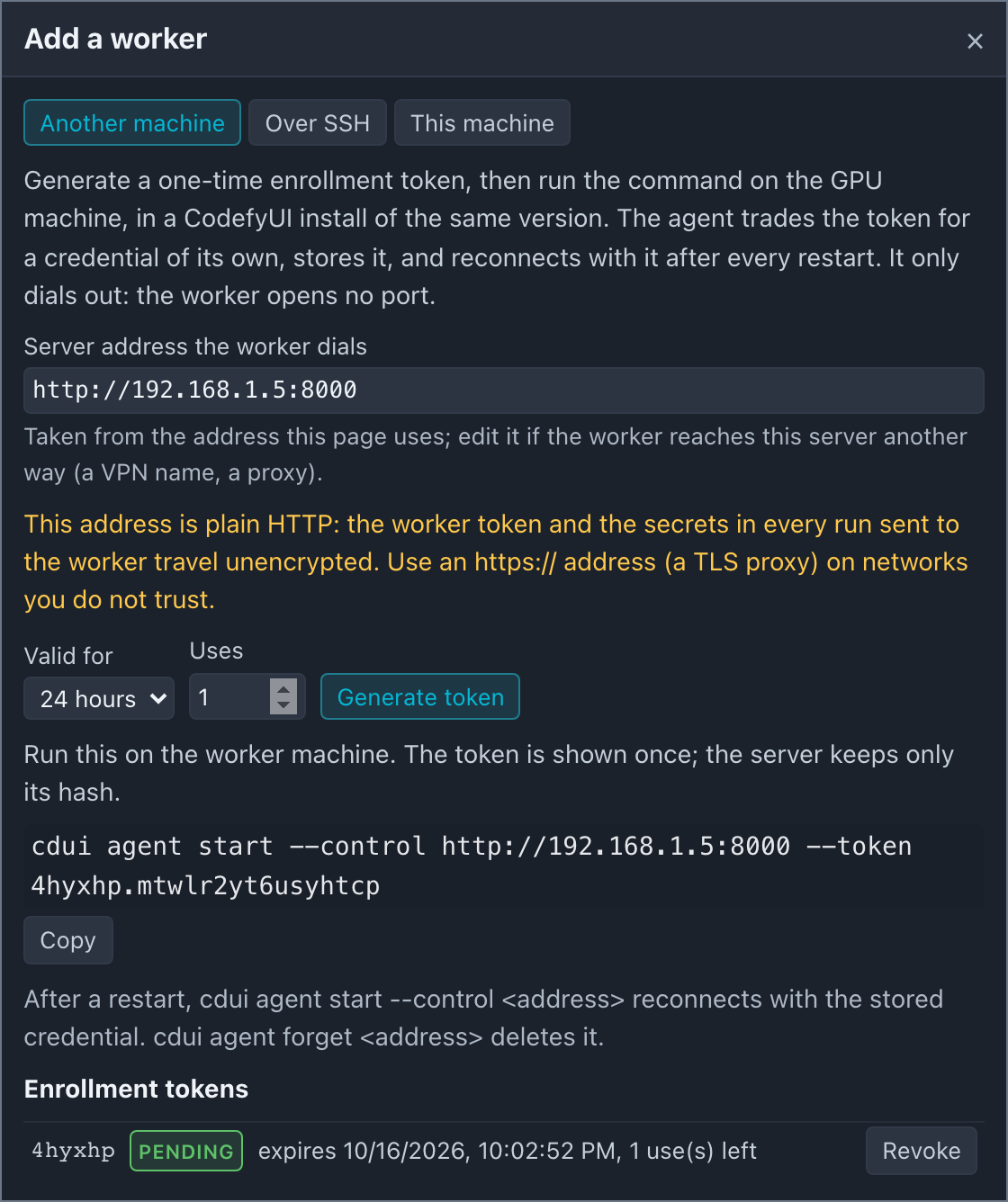
-
Run the command on the GPU server:
cdui agent start --control http://192.168.1.5:8000 --token abcdef.0123456789abcdefThe agent trades the enrollment token for a worker credential of its own and stores it in
<user-data>/agent/<host>-<port>.token(readable by that OS user only;<user-data>is.codefyui_dev/in the install).--namesets the worker name (default: the hostname),--devices cuda:0,cuda:1limits the GPUs it offers, and--mount data=<path>names a shared folder (Storage). All flags: CLI Commands, Agent commands. -
Check that it is online. Within a few seconds the worker appears in the Workers panel as Online, with its version, node types and devices. Send it a run with Queue on... or
cdui run --target <name>.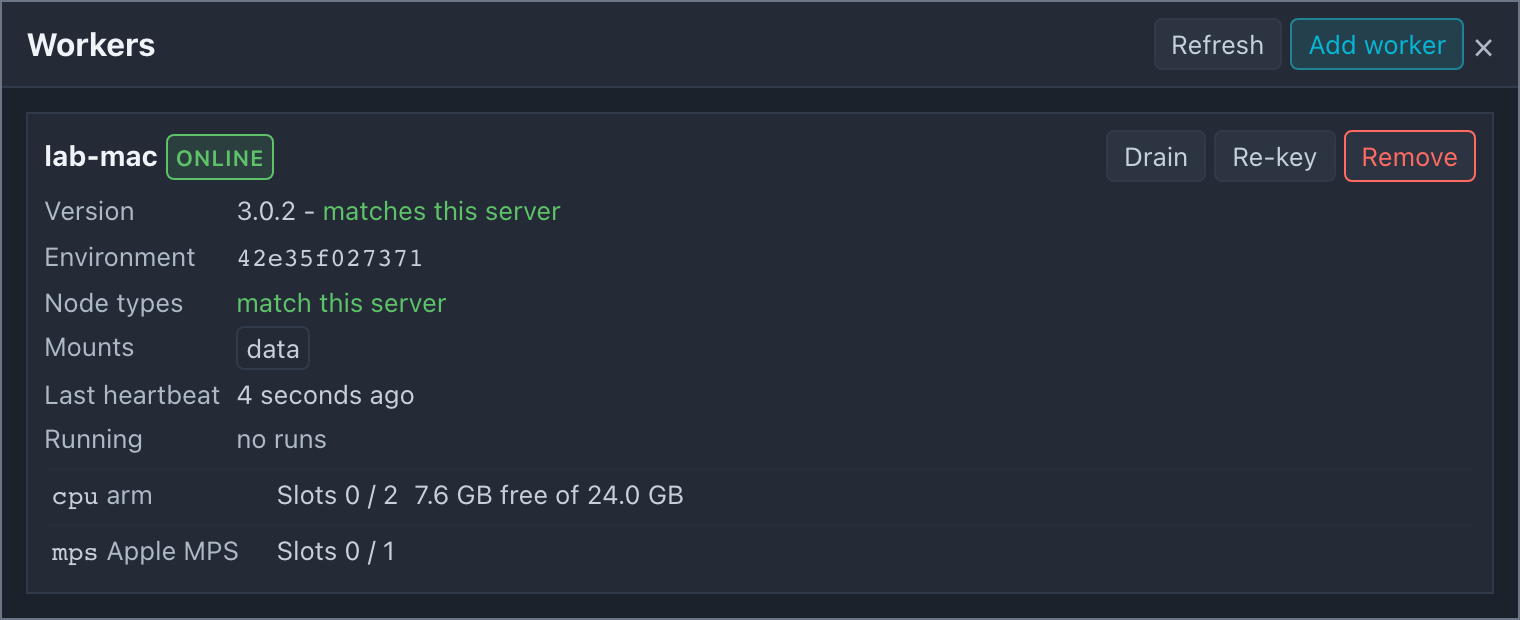
The enrollment token is shown once; the server keeps only its hash. A used-up, expired or revoked token is refused with a message that says which. The tokens issued are listed in the dialog until you delete them.
Restarts. cdui agent start --control <url> finds the stored credential and reconnects with it, without a token. An enrolled worker is remembered by the server across its own restarts: it is listed as offline until it connects, and runs that target it wait in the queue. cdui agent forget <url> deletes the stored credential, so the next start enrolls again.
Removing a worker. Remove in the Workers panel revokes the worker's credential, disconnects it (its running runs end interrupted at once, including runs waiting for it to reconnect, and its queued runs fail), and drops it from the list. Its agent is refused from then on: an agent still running on that credential is told it was revoked and stops with a message saying so (exit status 2), and the attempt is listed under Refused connections (once an hour per credential). A token refused for any other reason (another control plane or database at the address, a proxy, a session token from before a server restart) is retried, with advice for that kind of token. A re-keyed worker's old credential is refused the same way.
Re-keying a worker. A name is taken once enrolled: an ordinary token cannot enroll it again (the server answers 409). To give a worker a new credential, for a reinstalled machine or a lost credential file, press Re-key on its card: the token generated there can enroll that worker only, and the command carries its --name. Using it invalidates the old credential. If the machine still has the old credential file, run cdui agent forget <url> there first.
The panel itself (status, drain, slots, refused connections) is described under Multi-GPU Execution, The Workers panel.
Reaching the control plane
The agent needs one URL that reaches the control plane's HTTP port: it enrolls with POST /api/workers/enroll and then holds the /ws/worker WebSocket open. Pick one of three ways.
| Way | When | Encrypted |
|---|---|---|
| Direct | Both machines on one trusted LAN or VPN | No, unless the VPN encrypts |
| Behind a TLS proxy | The control plane is a server others reach over HTTPS | Yes |
| Over SSH | The GPU server is reachable only by SSH, or the control plane is a laptop behind NAT | Yes (the SSH session) |
Direct: LAN or VPN
By default cdui start listens on 127.0.0.1, which no other machine can reach. Start it with cdui start --host 0.0.0.0. The server then accepts its own interface addresses (such as 192.168.1.5:8000) as a Host; if the worker dials a hostname instead (gpu-gw.lan:8000, a VPN name), add it to CODEFYUI_EXTRA_ALLOWED_HOSTS before starting the server:
CODEFYUI_EXTRA_ALLOWED_HOSTS=gpu-gw.lan:8000 cdui start --host 0.0.0.0
Anyone who can reach that port controls the server, and the worker token and every run's inputs cross the network unencrypted: use this on a network you trust, such as a lab LAN or a WireGuard or Tailscale VPN. The agent prints one warning when it connects over plain HTTP to another machine, and the Workers panel marks the worker Plain HTTP.
Behind a TLS proxy
For a control plane that others reach over the network, put it behind nginx with TLS as in Deployment Behind a Reverse Proxy. That site configuration already carries /ws/worker and the artifact uploads (Workers behind this proxy). Give the worker the https:// address:
cdui agent start --control https://codefyui.example.com --token abcdef.0123456789abcdef
The agent checks the proxy's certificate on every connection (Trust); a self-signed certificate needs --ca-fingerprint.
Over SSH
For a GPU server you reach with SSH and nothing else, for example a laptop behind NAT and a server that only opens port 22, the control plane can start the worker itself. It runs ssh to the GPU server, starts cdui agent start there, and the agent connects back through a reverse tunnel in the same SSH session (ssh -R). Neither machine opens a port, and the control plane can stay on 127.0.0.1.
Before you start:
-
CodefyUI is installed on the GPU server, in the same version, with
install.sh(step 1 above). The control plane does not install it for you. -
The control plane's machine has an OpenSSH client on its PATH (
ssh). macOS and Linux have one; on Windows, add the OpenSSH Client optional feature, and the server must be started from a session that has it on PATH. -
ssh <target>works from a terminal on the control plane's machine, as the OS user that runscdui start, without any prompt. ssh runs withBatchMode=yes: no password, and a key with a passphrase only throughssh-agent. Your~/.ssh/configapplies, so aHostalias, aProxyJumpthrough a bastion and the keys it names all work:# ~/.ssh/config on the control plane's machineHost gpu-boxHostName 10.0.3.17User aliceProxyJump bastion.labIdentityFile ~/.ssh/id_ed25519
Adding one. Open Workers, press Add worker, and choose Over SSH:
| Field | Meaning |
|---|---|
| SSH target | user@host, or a Host alias from the server account's ~/.ssh/config (gpu-box above). |
| Port | ssh's -p. Left at 22, it is not passed, so the port in your ssh config for that host applies. |
| Worker name | Optional; the target's host name by default (alice@gpu1.lab becomes gpu1). A name another worker already has is refused. |
| Identity file | Optional; a private key on the server's machine (ssh's -i). Empty uses your ssh config and agent. |
| cdui on the remote host | The launcher's path there; empty means ~/CodefyUI/cdui, where install.sh puts it. |
Press Add and connect. The worker's card shows an SSH tunnel line: Connecting while ssh runs and the agent has not connected yet, Up once it has, Failed with the reason and the last lines ssh or the agent wrote (a refused key, an unknown host, a missing cdui) while it waits to try again, or until Retry for a failure no retry fixes (described below), and Stopped when disabled. Recent ssh output shows more of that output.
What runs. For each enabled SSH worker the control plane keeps one process like this:
ssh -T -o BatchMode=yes -o ExitOnForwardFailure=yes -o ServerAliveInterval=15 \
    -o StrictHostKeyChecking=accept-new \
    -R /home/alice/.codefyui-ssh/3f9a12c4-18000/sock:/tmp/cdui-ssh-k2j4/s -- alice@gpu-box \
    "sh -c '... ~/CodefyUI/cdui agent start --uds ~/.codefyui-ssh/3f9a12c4-18000/sock --foreground --control http://cp-3f9a12c4.invalid:18000 --name gpu-box'"
Before each session a short separate ssh creates ~/.codefyui-ssh/<id>-<slot>/ on the remote host (mode 0700, as is ~/.codefyui-ssh), removes a socket a dropped session left there, and reports the directory's full path, which -R needs. The forward's remote end is a Unix socket in that directory, so both machines need OpenSSH 6.7 or later and the remote sshd must allow AllowStreamLocalForwarding (on by default); nothing else is needed on the remote host. <id> is this control plane's instance id (eight hex digits it keeps in its user-data directory as ssh-instance-id), so two control planes that use the same account on one GPU server never share a directory, a socket, a credential or an agent. The forward's local end (/tmp/cdui-ssh-k2j4/s above) is a listener the control plane opens for this worker alone: a Unix socket in a private temporary directory (on Windows, an ephemeral port on 127.0.0.1), never the server's own port. The slot number comes from CODEFYUI_SSH_REMOTE_PORT_RANGE (18000-18100) and is kept with the worker: it names the state directory and the address the agent stores its credential under (--control http://cp-<id>.invalid:<slot>, a name that resolves nowhere); the agent dials the socket (--uds). The remote command puts ~/.local/bin on PATH first: a non-interactive ssh shell does not read your shell profile. When ssh exits, the control plane starts it again after 2 s, doubling up to a minute, and again after its own restart. If the remote sshd does not allow the forward at all (AllowStreamLocalForwarding no, DisableForwarding yes; an explicit refusal, or three failed forwards in a row), the tunnel stays Failed with that reason and stops retrying; Retry starts it again once the server's admin has allowed forwarding to a Unix socket. So does a failure no retry fixes: the host key does not verify, or the remote shell cannot run cdui at the path given (the session exits 127 or 126). A refused login (Permission denied) or a host name that does not resolve can heal by itself (an ssh-agent unlocked later, a VPN or network coming up): the tunnel keeps retrying with the same backoff and shows the reason, and stops only once the failure has lasted 10 minutes without a break. Retry is shown on every failed tunnel and tries again at once; it leaves a Drain set on the worker in place (only Enable after Disable undrains it). Recent ssh output holds the last attempt's lines only. The tunnel line also shows the remote agent's pid once the agent runs: on the remote host the agent's command line is python .../scripts/dev.py agent start --uds ..., so pgrep -af 'agent start' finds it.
Credentials. Each start sends a one-time enrollment token (valid 10 minutes) on ssh's standard input, never on a command line, so ps on either machine does not show it. The first start enrolls the worker; the agent stores its worker credential on the remote host for the address http://cp-<id>.invalid:<slot>, and every later start reconnects with it and leaves the token unused. Once the worker is enrolled, the token is bound to it, so it can only re-key that worker. The first start on a slot this worker has not used before runs cdui agent forget for that address first, so a credential another worker or another control plane left there is never presented. If one is presented anyway (the agent reports that the control plane refused it, or the agent reports a credential for another worker name), the control plane starts the agent again with cdui agent forget first, which enrolls it anew. Every tunnel arrives from the control plane's own address, so enrollment attempts through a tunnel are rate-limited per SSH worker, apart from each other and from agents on that machine.
A dropped session. When the session ends without Disable (the laptop sleeps, the network goes), the remote agent keeps running and so do its runs; they wait disconnected on the control plane and keep their events, as in When the connection drops. The control plane starts ssh again with the same slot, so the forward comes back at the same socket path, and the remote script, finding the agent alive, attaches to it instead of starting another (the tunnel line shows the pid it re-attached to). The agent reconnects through the new tunnel by itself and its runs continue. With no session back within CODEFYUI_WORKER_RESUME_GRACE_S (5 minutes), the agent stops. The remote script keeps the agent's pid and log in ~/.codefyui-ssh/<id>-<slot>/ on the remote host, beside the socket.
Disable, Enable, Delete. Disable drains the worker, then ends its ssh session; a disabled worker stays drained even if an agent connects under its name later. Disable tells the remote agent to stop through the session (or, when no session is up, with a short separate ssh), and the agent stops a run still on it; drain first and wait for it when that matters. The agent asks each run to stop and gives it a grace of 10 seconds: a run that stops within it ends cancelled, and one it has to terminate after that ends interrupted. The agent uploads what a transfer run wrote (its interrupt checkpoint) and reports how each run ended before it exits; the control plane gives it up to 60 seconds for that before it ends ssh, and a run still unreported then ends interrupted at once instead of waiting out CODEFYUI_WORKER_RESUME_GRACE_S. Remove stops it the same way. A server shutdown stops every SSH worker while the server's own runs drain, not before them, with 25 seconds in all for the SSH workers. cdui stop kills the server after about 2 seconds: the agents have already been told to stop and their ssh sessions end once they have, but a run that had not reported by then is marked interrupted at the next start. A remote agent from an earlier build, left in the old ~/.codefyui-ssh/<slot>/ layout and dialling a TCP port, is stopped by the next session's preparation once no session is attached to it (and reported while one is). Enable starts the session again. In the Workers panel a disabled worker reads Disabled and offers no Drain / Undrain, and Disable on a worker that has runs, Delete and Remove each take a second press, with what they do said on the card first. Delete (on a worker that has not connected yet) and Remove (on one that has connected, also while it is away) do the same: they end the session, delete the SSH entry, and revoke the worker as Removing a worker describes, so the name can be added again. They also clean up on the remote host, which Disable does not (Enable reuses the stored credential): after the answer, one more short ssh runs in the background, stops the agent if it still runs, forgets the credential it stored for http://cp-<id>.invalid:<slot> (cdui agent forget) and removes ~/.codefyui-ssh/<id>-<slot>/. Only this control plane's slot is touched, never another control plane's, and no other SSH worker takes that slot until the clean-up has finished. A session still attached there, or an agent that does not stop, keeps both. If the remote host does not answer within about a minute, the server log names what was left; to remove it by hand, run cdui agent forget http://cp-<id>.invalid:<slot> and rm -r ~/.codefyui-ssh/<id>-<slot> on the remote host.
Security.
- Only your account on the remote host can reach the tunnel. Its remote end is a Unix socket in
~/.codefyui-ssh/<id>-<slot>/, a directory of mode0700, so another user of a shared GPU server can neither connect to it nor take its address first to catch the agent's token, as they could with a TCP port on the remote loopback. - On the control plane the tunnel reaches a listener of its own, opened per SSH worker and never the server's port: a Unix socket in a private (
0700) temporary directory, so other users of the control plane's machine cannot reach it either (on Windows, an ephemeral port on127.0.0.1, which they can). A token refused on that listener is not acted on: only the agent's own report makes the control plane forget its credential. That listener answers only what an agent uses:/ws/workerwith a worker token (the session token is refused there),POST /api/workers/enrollwith an enrollment token, and, with a worker token, the routes the transfer backend uses (Storage: no shared filesystem): the three input downloads (GET /api/files/download/...,/api/images/download/...,/api/models/download/...) andPOST /api/runs/{id}/artifacts/upload. Those downloads are open reads on the LAN, but through a tunnel one without a worker token answers403. Every other path answers404,GET /api/auth/bootstrapand the web UI included, whateverHostthe request names. On the server's own port noHostmarks a request as tunnelled: an SSH worker's address there is just aHostoutside the allowlist (421). StrictHostKeyChecking=accept-newtrusts a host the first time and refuses a changed key. SetCODEFYUI_SSH_STRICT_HOST_KEY_CHECKING=yesto require that the host is already in the server account'sknown_hosts.- The control plane uses the SSH access of the OS user that runs it, as the Source Control tab does with git. Anyone who controls this server can start an SSH worker on every host that user reaches.
- The agent behind the tunnel connects from
127.0.0.1, but it counts as a worker on the control plane's machine only when its machine id equals the server's, so a GPU server is never mistaken for the server's own machine. It authenticates with its worker token.
Where to run the control plane
The control plane holds the queue and records every event, so a run on a worker depends on it staying up and reachable.
-
A laptop works, with limits. Closing the lid closes every worker connection. A run whose worker is not back within
CODEFYUI_WORKER_RESUME_GRACE_S(5 minutes) endsinterrupted(When the connection drops), and a laptop that moves to another network changes the address direct workers dial (SSH workers follow it, since the tunnel starts from the laptop). RaiseCODEFYUI_WORKER_RESUME_GRACE_Sfor short naps; for overnight training, keep the laptop awake or use an always-on control plane. -
An always-on server is the robust choice. Run
cdui starton a machine that stays up (the GPU server itself, or a small box beside it) as a systemd service (Deployment, A systemd unit), and use the editor from your laptop. With the control plane on127.0.0.1, an SSH port forward is enough for the browser, and nothing else needs to be exposed:ssh -N -L 8000:127.0.0.1:8000 gpu-box # then open http://localhost:8000Workers on the same machine use the same-host command; workers elsewhere dial it directly, through the proxy, or over SSH as above.
Storage
A run that uses no files in the data folder (a pure-tensor graph, one whose Dataset or HuggingFaceDataset nodes download into a cache of their own, or one that reads a bundled sample such as data/samples/iris.csv, which every install has and a worker reads from its own) runs on any worker. A relative path in a node parameter is read from the install's backend/ folder on every machine, as on the server: cdui agent start works there whichever directory it was started in (the home directory over SSH). A relative path in a setting given to the agent at start, such as CODEFYUI_MODELS_DIR=models, still means that directory: the agent makes it absolute before it changes directory. A run that reads uploads or writes files needs one of two things: a folder both machines share, or the transfer backend, which moves the files over the agent's connection (or, when one is configured, through an S3 or MinIO bucket instead). A worker with the shared folder is preferred.
| Run | Worker with the data mount | Worker without it |
|---|---|---|
| Uses no files | Placed | Placed |
| Uses files, all of them uploads picked in a file field | Placed (preferred) | Placed: the files travel over HTTP (no shared filesystem). any tries it after the workers with the mount |
Uses files another way (a plain path, an upload this server lacks, inputs over CODEFYUI_TRANSFER_MAX_INPUT_BYTES), or CODEFYUI_TRANSFER_ENABLED=0 | Placed | Named worker: 400 at submit, worker gpu-box-1 has no `data` mount; add `--mount data=...` to its agent, or make the run fit the transfer backend: <reason>. any: skipped |
Shared filesystem
A run uses files when it has a node that reads an upload (CSVReader, ImageReader, ModelLoader, CheckpointLoader and the other upload fields), a node that saves (CheckpointSaver, ModelSaver, ImageWriter, VideoWrite), a TrainingLoop with checkpoint_every, checkpoint_every_steps or tensorboard, or a reader given a path in the data folder. Mount one network share on both machines and give it the same label: the control plane's data folder (the project directory with --project) is the label data (CODEFYUI_MOUNT_LABEL), and an agent names its own path for the label with cdui agent start --mount data=<path>. The paths may differ between machines.
An NFS example, with the share mounted at a different path on each machine:
# Both machines
sudo mount -t nfs nas.lab:/export/codefyui /mnt/codefyui      # on the GPU server: /nas/codefyui
# Control plane: keep the data folders on the share (the database stays local)
export CODEFYUI_DATA_FILES_DIR=/mnt/codefyui/data/files CODEFYUI_IMAGES_DIR=/mnt/codefyui/data/images \
       CODEFYUI_MODELS_DIR=/mnt/codefyui/data/models CODEFYUI_MEDIA_DIR=/mnt/codefyui/data/media
cdui start
# GPU server: the label is saved, so later starts need no --mount
cdui agent start --mount data=/nas/codefyui/data
On the worker, the run's data folders are derived from the mount path the way backend/data is laid out (files/, images/, models/, media/, graphs/, presets/), or, when the path holds codefyui.project.toml, from that project. A file the run records (a checkpoint, a TensorBoard folder) is stored relative to the mount (backend: "mount") and listed by GET /api/runs/{id}/artifacts and the Runs panel at the control plane's path; a row whose mount the control plane does not hold has path: null and is named by its label and relative path. An agent on the same machine as the server holds data without --mount: its runs use the server's data folders exactly as configured there, its files are listed as ordinary local files, and GET /api/workers shows the label with the server's path.
Mounts are saved in agent.json in the user-data directory and reused by later starts; --mount data= removes one. A saved mount whose folder is missing when the agent starts (the share is not mounted yet) is not offered until the folder appears; the agent checks again at every heartbeat. --mount cannot change while the agent runs: stop it first. With --project, uploaded data files stay in the install's data/files, outside the project, so they are not shared.
No shared filesystem
A run that reads uploads or writes files can go to a worker that shares no folder with the control plane. The control plane then acts as the file store: it sends the run's uploaded inputs to the worker and receives what the run writes. This applies when the run targets a worker without the shared folder, or when any finds no free worker with one.
Inputs. The files a run can take this way are the uploads picked in a file field: CSVReader and the other data-file fields, ImageReader, ModelLoader, CheckpointLoader. At assignment the control plane names each one by its SHA-256 hash. The agent keeps every file it fetched in <user-data>/agent-cache/<sha256>, so a later run that uses the same file does not download it again; a missing one is downloaded from the control plane's own download routes with the worker's token, and its hash is checked. While it fetches, the Runs panel's log shows fetching inputs 2/3: train.csv (1.2 MiB, fetched) (a run_warning of kind transfer_progress); cached instead of fetched means it came from the cache. A Stop during the fetch ends the run cancelled.
Where the run works. Each run gets a data folder of its own on the worker, <user-data>/agent-runs/<run id>/data, laid out like backend/data (files/, images/, models/, media/), with a copy of each input under the name the graph uses (a node that writes over its input cannot touch the cache). The worker's own data folder is not touched, except that runs share its cache/ folder (LMTokenizedDataset's token blocks). Datasets downloaded by Dataset or HuggingFaceDataset still go to the worker's own cache, as they do on the server.
Outputs. The agent uploads, before the run's end reaches the control plane:
- every file the run records as an artifact (a periodic checkpoint, a TensorBoard folder file by file), as the run reports it, into
<data folder>/runs/<run id>/<kind>/<name>; - after the run ends, every other file it wrote under
models/,media/oroutput/(CheckpointSaver, ModelSaver, VideoWrite, ImageWriter), and any input it wrote over, into the control plane's own data folders at the same relative path, where the same node writes on a local run (models/best.ptinCODEFYUI_MODELS_DIR). A different file already there is kept and the new one gets a suffix (best-1.pt); the same content is not stored twice. They are listed with kindoutput; - last, the checkpoint a stopped training loop writes, into the run's folder, so a cancelled run's resume point is on the control plane.
The uploads run beside the run, so a slow network never holds the run up; its end is reported once they are done. GET /api/runs/{id}/artifacts lists them with backend: "transfer" and their path on the control plane, and the Runs panel offers Download next to each one (GET /api/runs/{id}/artifacts/{artifact_id}/download). If the control plane cannot be reached (the connection dropped, or a proxy answers 502, 503 or 504), the agent keeps retrying, waiting longer each time, for as long as the control plane keeps a disconnected worker's runs (CODEFYUI_WORKER_RESUME_GRACE_S, 5 minutes by default), so a run that ends during an outage still delivers its files. The run's files share that window: once it has run out, each remaining file is tried once. A file larger than the control plane's upload limit (CODEFYUI_MAX_UPLOAD_SIZE, 500 MB), or one not taken after those retries, stays on the worker, listed at its path there, with a transfer_failed warning. A Stop that arrives while the last uploads are going stops the ones not sent yet, with one transfer_failed warning saying how many stay on the worker.
Clean-up. The run's own folder belongs to the run: when run retention (CODEFYUI_RUN_RETENTION_KEEP_LAST) or Delete removes the run, its runs/<run id> folder goes too. Download or copy what you want to keep. A run that retention removes after it ended interrupted keeps its checkpoint folder, as a local run keeps its resume point. Files placed in the data folders are yours, as a local run's are: neither removes them. On the worker, the run's folder follows the agent's own run retention; the cache is never cleaned automatically, and deleting agent-cache is safe (files are fetched again).
A run this cannot serve is refused at submit when it names a worker without the shared folder, and the message says why: a reader given a plain path (FileReader, ImageFolderDataset, ImageBatchReader, VideoLoad, DocumentLoader reading a folder) rather than an upload, an upload the control plane does not have, or inputs over the limit. For example: worker gpu-box-1 has no `data` mount; add `--mount data=...` to its agent, or make the run fit the transfer backend: its inputs add up to 3.10 GiB, over the transfer limit of 2.00 GiB (CODEFYUI_TRANSFER_MAX_INPUT_BYTES).
Inputs and outputs go to the same address as the agent's connection, with its worker token and the same certificate check (a pinned certificate is pinned for them too): without TLS they cross the network unencrypted. Behind a proxy, its request size limit must allow the largest output (Deployment).
An S3 or MinIO bucket
If the lab already runs MinIO, or uses S3, the bucket can take the control plane's place as the file store: the worker downloads the run's inputs from the bucket and uploads what the run writes to it, and the control plane keeps only the object keys. The run's files then never cross the control plane's network link, apart from each input, which the control plane puts in the bucket once.
It serves the same runs as the transfer backend (uploads picked in a file field, within CODEFYUI_TRANSFER_MAX_INPUT_BYTES) on a worker without the shared folder, and while it is on it takes their place. A worker with the shared folder is still preferred.
Setting it up.
- Install boto3 into CodefyUI's environment on the control plane and on every worker that should use the bucket:
uv pip install --python backend/.venv/bin/python boto3from the install folder, or in a development checkoutuv pip install -e "backend[s3]". An agent without it does not offer S3 (the agent's log lists the capabilities it connected with) and keeps getting the transfer backend; each such run logs astorage_fallbackwarning. - Create the bucket and a user for CodefyUI that can read and write it. With MinIO's client:
mc mb lab/codefyui, thenmc admin user add lab codefyui <secret>andmc admin policy attach lab readwrite --user codefyui. - Start the control plane with the bucket's settings:
export CODEFYUI_S3_ENABLED=1
export CODEFYUI_S3_ENDPOINT_URL=http://minio.lab:9000   # leave empty for AWS S3
export CODEFYUI_S3_BUCKET=codefyui
export CODEFYUI_S3_ADDRESSING_STYLE=path                # most MinIO setups
export CODEFYUI_S3_ACCESS_KEY_ID=codefyui
export CODEFYUI_S3_SECRET_ACCESS_KEY=<secret>
cdui start
The server log then says S3 artifact backend on: bucket codefyui at http://minio.lab:9000 (credentials: auto), or why the backend is off (no bucket, or boto3 missing). Workers need no setting of their own: the bucket, its address and the credentials come with each run. The control plane and every worker must reach the bucket at that same address.
Where the files go. Under CODEFYUI_S3_PREFIX (empty by default; codefyui/ puts everything under that folder):
inputs/<sha256>: an upload a run reads, put there by the control plane the first time a run needs it and named by its content, so the same file is never uploaded twice. The worker downloads it from there into the sameagent-cachethe transfer backend uses.runs/<run id>/<kind>/<name>: every file the run records as an artifact (a periodic checkpoint isruns/<run id>/checkpoint/<name>.pt, a TensorBoard folder goes file by file) and, underruns/<run id>/output/, every other file the run wrote undermodels/,media/oroutput/, at its path there (ModelSaver'siris/model.ptisruns/<run id>/output/models/iris/model.pt). The agent uploads them as it does for the transfer backend: beside the run, the interrupt checkpoint last, before the run's end is reported, with the same retries through an outage. Expired temporary credentials are retried the same way until new ones arrive (MinIO answersInvalidAccessKeyIdfor them; that answer is retried only for temporary credentials at or past their expiry). A file the bucket refuses (AccessDenied, no such bucket) stays on the worker with atransfer_failedwarning.
GET /api/runs/{id}/artifacts lists them with backend: "s3", path set to s3://<bucket>/<key> and relative_path to the key. In the Runs panel, Copy path copies the s3:// address (for mc or aws s3) and Download gets the file: through the control plane by default (CODEFYUI_S3_DOWNLOAD=proxy), or, with presign, by redirecting the browser to a pre-signed URL valid for CODEFYUI_S3_PRESIGN_TTL_S seconds, so the bytes go from the bucket to the browser (which must then reach the bucket's address itself). Unlike the transfer backend, a writer node's file is not placed in the control plane's models/ folder: download it before a local run reads it.
Credentials. CODEFYUI_S3_CREDENTIALS decides what a worker gets:
sts: temporary credentials from the endpoint's STS (AssumeRole), with a session policy that allows writing only underruns/<run id>/and reading only the run's inputs, valid forCODEFYUI_S3_STS_DURATION_S(an hour by default). The control plane sends new ones before they expire for as long as the run lasts. MinIO issues them for an ordinary user's keys; AWS needs a role to assume (CODEFYUI_S3_STS_ROLE_ARN). A run whose credentials cannot be issued fails before it is sent.static: the control plane's own keys. Give CodefyUI a user that can reach this bucket only.auto(the default):sts, and the control plane's own keys when STS refuses, with a warning in the server log; STS is then not asked again for 10 minutes, or until the S3 settings change.
The credentials travel in the run's assignment, like its secret parameters (Trust between agent and control plane): over a plain http:// control plane address they are not encrypted. The agent keeps them in memory, never in a file or its log, and the run's subprocess does not get them. The control plane reads its keys from its environment and writes them to no database or log.
Clean-up. Run retention and Delete remove a run's objects under runs/<run id>/ and abort its unfinished uploads, keeping output/ (writer nodes' files stay, as the transfer backend leaves them in the data folders) and, when retention removes a run that ended interrupted, its checkpoint/. A bucket the control plane cannot reach then is logged and its objects stay; for Delete the answer also says so in warning. What no run row names (kept output/ folders, inputs/, uploads left by a worker that died) is for the bucket's lifecycle rules. On AWS S3:
{"Rules": [
  {"ID": "codefyui-abandoned-uploads", "Status": "Enabled", "Filter": {"Prefix": "runs/"},
   "AbortIncompleteMultipartUpload": {"DaysAfterInitiation": 1}},
  {"ID": "codefyui-inputs", "Status": "Enabled", "Filter": {"Prefix": "inputs/"},
   "Expiration": {"Days": 30}}
]}
(aws s3api put-bucket-lifecycle-configuration --bucket codefyui --lifecycle-configuration file://rules.json, with the prefixes under CODEFYUI_S3_PREFIX if it is set). MinIO refuses AbortIncompleteMultipartUpload: it removes unfinished uploads by itself after 24 hours (mc admin config get lab api shows stale_uploads_expiry), so only the expiry rule is needed, mc ilm rule add lab/codefyui --prefix "inputs/" --expire-days 30. An expired input is uploaded again by the next run that needs it.
Each row records its bucket, and its key carries the prefix of its time, so a CODEFYUI_S3_BUCKET or CODEFYUI_S3_PREFIX changed later applies to new runs only: earlier runs' files still list, download and get removed where they are (the control plane's keys must still reach the old bucket).
Keeping workers in sync
A worker must run the same CodefyUI version as the control plane, and it should know the same nodes. The control plane checks both every time the agent connects.
Version. An agent of another version is refused with both versions in the reason, for example version mismatch: worker 3.1.0, control plane 3.1.2. The agent stops instead of retrying, and the Workers panel lists the name under Refused connections with that reason, so a worker that never appears says why; an agent that tried to take the name of a connected worker is listed there with its address, never on that worker's card. The version is read before anything else in the agent's first message, so even an agent whose message format changed gets this reason. To update, run cdui update on the control plane and on every worker (or install the same CODEFYUI_RELEASE_TAG), then start the agents again; the refusal is cleared when the name connects. The panel keeps the last refusal per name until the server restarts.
Node types. Plugins, Package Center packs and custom nodes are installed per machine. When the agent starts, a short-lived helper process loads every node the way a run does and reports the node types and a hash of their definitions (the node catalog). When the hash differs from the control plane's, the worker is Degraded and its card lists the types the worker lacks and the ones only it has. A degraded worker:
- never receives a run whose target is
anywhen it lacks a type the control plane has (a worker that only has more types stays eligible); - receives a run only when every node type the graph uses is one it has: after presets and subgraphs are expanded, including the nodes of every installed preset a Map node runs. Otherwise the submission is refused with the missing types named, and a queued run is failed the same way before it is sent, in case the worker reconnected with fewer types while it waited.
To clear it, install the same plugins and packs on the worker (cdui plugin install ..., the Package Center, the same custom node files) and restart the agent: it reports its nodes only when it starts. A worker whose helper failed reports no catalog: its card warns about it, any skips it, and a run that names it is sent without the check (the agent's log says why the helper failed). No command copies the control plane's plugin set to a worker yet.
Environment fingerprint. The same helper collects the worker's environment fingerprint (CodefyUI commit, Python, torch build, accelerators, plugin revisions, numerics-relevant environment variables). The Workers panel shows its digest, and every run the worker executes records that digest when it starts (a worker that reconnects without one shows "not reported", never an older digest). The run subprocess then reports the fingerprint of the code, plugins and custom nodes it loaded, which replaces it (execution_facts.fingerprint_source: "worker-run"), so a worker whose checkout or plugins changed after its agent started records what actually ran, not what the agent saw. Both describe the machine's devices as the agent sees them, before a run's device set narrows CUDA_VISIBLE_DEVICES, so the two digests are equal when nothing changed. The subprocess also reports its torch numerics switches (execution_facts.resolved.numerics). See Run environment.
When the connection drops
A worker is disconnected when its connection closes or it misses three heartbeats (30 s). Its runs keep running on the worker, which keeps their events on disk until the control plane confirms it has recorded them. Each run's status becomes disconnected, with a run_warning of kind worker_disconnected; it keeps its slots, and the Runs panel shows how long ago its worker went away (GET /api/runs/{id} reports it as worker_status). Then one of three things happens:
- The worker reconnects within the grace (
CODEFYUI_WORKER_RESUME_GRACE_S, 5 minutes): it sends the events the control plane has not recorded, in order, and the run isrunningagain with arun_warningof kindworker_reconnected. Its event log has no gap and no duplicate. - It does not: the run ends
interruptedand its slots are freed. If the worker comes back later and still has the run, it is told to stop it at once, so the card is free for the next run; how the run ended there is recorded aslate_resulton the run ({status, error, worker_id, at}, inGET /api/runs/{id}and inexecution_facts), and its status and event log stay as they were. - The control plane restarts meanwhile: the restarted control plane takes the run over, as described below.
When the control plane restarts. A control plane that stops without stopping its runs (killed, crashed, a laptop that loses power) leaves its worker runs executing: their subprocesses keep going and the agent keeps their events. At its next start the control plane takes every such run over instead of ending it. The run reads disconnected, with a run_warning of kind worker_disconnected saying the server restarted, holds its slots again, and keeps the same event log. When its worker reconnects (an SSH worker's tunnel is started again by the control plane itself) and still has the run, the run is running again and continues where the control plane last confirmed it: the events of up to the last second before the stop may appear twice, and none is missing. A worker that does not reconnect within CODEFYUI_WORKER_RESUME_GRACE_S, counted from the restart, ends the run interrupted with the reason it did not reconnect with the run within 300 s after this server restarted; a worker that reconnects without the run (its agent restarted too) ends it at once. A transfer run's uploads continue after the restart, and the files received before it stay with the run. An s3 run's worker is issued new credentials as soon as it reconnects, since the ones it holds came from the previous process, and they are renewed as usual from then on. Runs that executed in the control plane itself, runs still waiting in the queue, and worker runs started by CodefyUI 3.1.0 (which did not record where to resume) end interrupted as before. A Stop asked while the worker was away is remembered across the restart and sent when the worker is back. A graceful shutdown while a taken-over run still waits for its worker ends that run interrupted at once, and a worker run that does not stop within the shutdown's grace also ends interrupted; the worker is told to stop it when it next connects. A graceful shutdown (systemctl stop, Ctrl+C on Windows) still stops the worker runs (Run Queue, When the server stops), so nothing is left to take over.
CODEFYUI_WORKER_RESUME_GRACE_S is read by the control plane; 0 ends a disconnected worker's runs at once, and a restarted control plane then takes none over. An SSH worker's agent uses the same grace to decide when to stop waiting for its tunnel (A dropped session).
Trust between agent and control plane
A run sent to a worker carries its graph with the values of its secret parameters (API keys, passwords) filled in, so each end has to know who it is talking to. The control plane knows the agent by its worker credential. The agent knows the control plane by its TLS certificate, checked the same way for the enrollment request, for every /ws/worker connection and for every file transfer. What this means for SECRET parameters on a shared instance is in Shared Instances, Runs sent to a worker.
CodefyUI serves no TLS itself; put it behind a TLS proxy (Behind a TLS proxy) and give the worker the https:// address, or use the SSH way, whose session encrypts the tunnel.
A certificate the worker's CAs trust (a public CA, or a company CA installed on the worker): nothing to do. The agent checks it like a browser does (the certificate authority and the host name) on every connection and records nothing, so a renewal, even with a new key, keeps working.
A self-signed certificate, or a CA the worker does not have: pin its key. --ca-fingerprint takes the SHA-256 of the server certificate's public key (its SubjectPublicKeyInfo, written sha256:<64 hex digits>), the way kubeadm join --discovery-token-ca-cert-hash does:
cdui agent start --control https://cp.lab --token abcdef.0123456789abcdef \
  --ca-fingerprint sha256:96d448128bb7dfbceea1a628393cfdd0f1f86716ad81deb4fab0c0fe281a0690
The flag keeps its name, but it pins the server's own (leaf) certificate key, never a CA's: a pin matches only the certificate whose key the TLS handshake proved, on every Python version. With a pin the agent checks neither the certificate authority nor the host name. A certificate that does not match is refused before the token is sent, with both fingerprints printed, and the agent exits with code 2. The pin is recorded in the credential file (<user-data>/agent/<host>-<port>.token), so later starts keep it without the flag; a stored value that is not a valid fingerprint is reported in the log, naming the file, and ignored (the worker credential stays usable).
To get the fingerprint, run this on the proxy host, against the certificate file the proxy serves (the leaf comes first in fullchain.pem):
openssl x509 -in /path/to/fullchain.pem -pubkey -noout | openssl pkey -pubin -outform der | openssl dgst -sha256 | awk '{print "sha256:" $NF}'
The Add worker dialog shows this command when the address is https://. If the control plane can read the certificate file itself, set CODEFYUI_TLS_CERT_FILE to its path: the dialog then shows the fingerprint and the generated command carries --ca-fingerprint (the server reads the file again only when it changes). Leave it unset when the worker's CAs trust the certificate, so the command does not pin a key that a renewal will replace.
A certificate the worker's CAs reject, without a pin, is not used: the enrollment fails, and a running agent logs the error with its cause (the first time with the fingerprint the server presents, to compare with the dialog's and pass with --ca-fingerprint) and retries with its usual backoff, so a proxy being repaired or a CA bundle being updated needs no restart.
After a pinned certificate changes its key, check the new fingerprint on the proxy host, then either:
- run
cdui agent start --control <url> --ca-fingerprint <new fingerprint>, which keeps the worker credential and records the new pin after it connects; or - run
cdui agent forget <url>, which deletes the credential with its pin, and enroll again with a new token.
A renewed certificate keeps its fingerprint only if it keeps its key (certbot's --reuse-key).
Plain HTTP. Over an http:// address to another machine, cdui agent start prints one warning: the worker token and the secrets in every assignment travel unencrypted. The agent still connects. The Workers panel marks such a worker Plain HTTP: its connection reached the server unencrypted from another machine. The server decides from the scheme it was reached with (wss only when uvicorn reports it, which it does for a proxy listed in --forwarded-allow-ips; CodefyUI never reads X-Forwarded-Proto itself) and from the peer address: a loopback peer, such as a same-host agent or the local end of an SSH tunnel, carries no badge, since the hop across the network is not that socket. An http://127.0.0.1 address prints no warning on the agent for the same reason.
On the worker. The agent hands a run's secret values to its subprocess in memory and writes them to no file of its own, but the worker machine holds them for the length of the run: whoever administers that machine is trusted with them. The worker credential file is readable by the agent's OS user only.
On the control plane. An enrolled worker can write files into the control plane's models/, media/ and output/ folders and record them as downloadable artifacts of its runs (No shared filesystem), so enroll only machines you trust.
Not covered: mutual TLS (the worker credential identifies the agent), a certificate authority managed by CodefyUI, and user identity.
Running the agent as a service
On a Linux GPU server, run the agent under systemd so it starts at boot and comes back after a crash. This mirrors the server's unit in Deployment, A systemd unit: an install in /opt/codefyui owned by a codefyui user.
Enroll once, as the service user, so the credential lands in that user's data directory, then stop the background agent the command started:
sudo -u codefyui /opt/codefyui/cdui agent start --control https://codefyui.example.com --token abcdef.0123456789abcdef
sudo -u codefyui /opt/codefyui/cdui agent stop
Add --name, --mount and --ca-fingerprint here when you need them: the name and the pin are kept in the credential file, and mounts in agent.json, so the unit does not repeat them.
[Unit]
Description=CodefyUI worker agent
After=network-online.target
Wants=network-online.target
# On an NFS-backed --mount, also: After=remote-fs.target

[Service]
Type=exec
User=codefyui
Group=codefyui
WorkingDirectory=/opt/codefyui

# --foreground on purpose: systemd is the supervisor, so the agent must not
# daemonize away from it. The stored credential (from the enrollment above)
# is used; no token is needed here.
ExecStart=/opt/codefyui/cdui agent start --foreground --control https://codefyui.example.com

Restart=on-failure
RestartSec=5s
# On SIGTERM the agent asks its runs to stop and terminates them after 10 s.
TimeoutStopSec=60s
# SIGTERM to the agent only: with the default (control-group) systemd also
# signals the run subprocesses directly, and a running run ends `failed`
# instead of `cancelled`. The rest of the group is killed after TimeoutStopSec.
KillMode=mixed

# Deliberately NOT PrivateDevices (breaks GPU access) or ProtectHome /
# ProtectSystem=strict (both break writes to the user data dir under
# /opt/codefyui/.codefyui_dev/, where the credential, spool and run folders live).
NoNewPrivileges=yes
PrivateTmp=yes

[Install]
WantedBy=multi-user.target
sudo install -m 644 codefyui-agent.service /etc/systemd/system/codefyui-agent.service
sudo systemctl daemon-reload
sudo systemctl enable --now codefyui-agent
journalctl -u codefyui-agent -f
--foreground is required for the same reason as the server's: without it cdui agent start starts a background agent and exits, and systemd treats the exit of a Type=exec service's main process as the service ending. An agent refused for a version mismatch exits with an error, and Restart=on-failure retries it every 5 s until you update; systemctl stop codefyui-agent while you update avoids that. Keep KillMode=mixed: it lets the agent stop its runs itself, so a run in progress ends cancelled (a training loop writes its interrupt checkpoint); with systemd's default the run subprocesses get SIGTERM directly and the run ends failed with run subprocess exited with code -15. An SSH worker needs no unit: the control plane keeps its agent running.
One-shot workers: SLURM and ssh
cdui agent start --one-shot takes exactly one run, reports it and exits, like a GitHub runner started with --ephemeral. Start it inside a batch job or an ssh command: the batch system decides which machine and which GPU the job gets, and CodefyUI sends the graph and records the result.
cdui agent start --one-shot --control https://codefyui.example.com
- Which runs reach it. Any available never sends a run to a one-shot worker. A run reaches it when it names the worker (
"target": {"worker": "<name>"}) or the one-shot pool: A one-shot worker in Queue on..., or"target": {"pool": "one-shot"}inPOST /api/runs(withdeviceset to the kind it needs, such ascuda). A pool run is never refused for want of a worker: it waits for a one-shot worker that offers its device, withqueue_reasonsaying so, and fails afterCODEFYUI_WORKER_ONE_SHOT_QUEUE_TIMEOUT_S(24 hours by default,0waits forever). Pool runs wait in one line per device kind, oldest first.--run-id <id>makes the agent take only that run, wherever it is in its line; the run must be waiting in the pool or name the worker, otherwise the agent is refused when it connects. - No recorded outputs. A run with Record node outputs is refused for the one-shot pool and for a one-shot worker: the agent exits when the run ends, so the Inspector could never read what it recorded.
- Exit code.
0: the run succeeded and the control plane recorded it.1: it failed, was cancelled or endedinterrupted, or its outcome could not be delivered.2: the control plane refused the agent (another version, a name another agent holds, a--run-idthat does not wait for it) or a flag is wrong.3: the agent was stopped (SIGTERM, Ctrl-C, the job's time limit) before a run arrived.4: it could not start (enrollment failed, or--mountwas refused). A refusal after the agent took its run (a reconnect the control plane refused) is1: the run's outcome was not recorded. - A dropped connection. The run keeps going and the agent reconnects, as any agent does (When the connection drops). It exits only once the control plane has acknowledged the run's end; if that has not happened within
CODEFYUI_WORKER_RESUME_GRACE_Safter the run ended, it exits anyway with1and leaves the result spooled for a later agent with the same user-data folder. - Afterwards. The Workers panel lists it with a One-shot badge and Offline status, and One-shot run links to the run it took (or says it left without one). The next job's agent under the same name takes the next run. The control plane records that the worker's own last agent was one-shot, so after a restart of the control plane a run naming it is timed by
CODEFYUI_WORKER_ONE_SHOT_QUEUE_TIMEOUT_Sat once, before its next agent connects. Instances (below) do not set this record: feed an array through the one-shot pool (target.pool: "one-shot"), not with runs naming the credential. A run naming an instance (<name>.<ID>) is always timed this way. - One agent per name at a time. The credential names the worker, so two jobs started with the same credential would share a name. While a one-shot worker is connected, or its run is in flight, another agent under its name is refused with exit code
2. For jobs that run at the same time, use instances (below). - Instances: several jobs on one credential.
--instance [ID](one-shot agents only) makes the agent one of several sharing the credential and the user-data folder, such as the tasks of a SLURM array. It registers as<name>.<ID>; without a value,IDis<SLURM_ARRAY_JOB_ID>-<SLURM_ARRAY_TASK_ID>in an array task,SLURM_JOB_IDin another job, and 16 random hex characters elsewhere; inside a job step (srun)-<SLURM_STEP_ID>-<SLURM_PROCID>follows, so the tasks ofsrun -n 4get IDs of their own. Each instance is a one-shot worker of its own: it takes one run (a pool run, or one naming<name>.<ID>), and no other instance can take its name or its run while it holds them, also after a restart of the control plane. What is set on the credential applies to every instance: Drain, the device admission policy of each card (a policy set through an instance is stored for the credential), and a<name>/<device>cap inCODEFYUI_RUN_QUEUE_MAX_CONCURRENT(a<name>.<ID>/<device>entry overrides it for one instance). An instance never changes the credential's own entry (its devices, its one-shot flag), so the credential's regular agent can stay connected beside its instances. The Workers panel lists the instances inside the credential's card (Shared credential, with how many are connected and running): a card for each live one, and one line for each that left. Remove on the credential revokes it, so every instance disconnects, the runs they execute endinterrupted, and the runs queued for any of them fail. An instance has Remove only once it left, and it only takes the line off the list; a connected instance (or one with a run in flight) cannot be removed on its own, since its agent would reconnect with the token it holds. Tasks that start together with an enrollment token and no stored credential take a lock in the user-data folder: the first enrolls (one use is enough) and the others use the credential it stored. On a file system without file locks (Lustre mountednoflock, some NFS) the agent logs a warning and goes on without locks: enroll once before starting the array, and give each task its own ID. An instance keeps its run's files in<user data>/agent-instances/<ID>/and deletes them when it exits, so a result it could not deliver is not sent later by another agent. One that was killed (SIGKILL, the OOM killer, a node reboot) leaves the folder; the next instance to start deletes it once no agent holds that ID and nothing in it changed for 24 hours. A second agent started with the ID of one still running in the same user-data folder exits2before it touches that folder. The panel keeps the 50 most recent instances that left per credential, until the control plane restarts. - It is always in the foreground and writes no pidfile, so it never conflicts with a background agent on the same machine. Without the batch system's time limit, nothing ends an agent that no run reaches: wrap an
sshcommand intimeoutif it must not wait forever.
SLURM
Generate an enrollment token with Add worker (one use is enough), then submit jobs. Every task of the array below runs at the same time on one credential, each as an instance (slurm.<array job>-<task>). The user-data folder must be on a filesystem every node shares, as the home directory usually is:
#!/bin/bash
#SBATCH --job-name=codefyui-run
#SBATCH --gres=gpu:1
#SBATCH --cpus-per-task=8
#SBATCH --time=04:00:00
#SBATCH --array=0-3
#SBATCH --output=codefyui-%A_%a.log

module load cuda/12.4          # what your cluster calls it
export CODEFYUI_USER_DATA_DIR="$HOME/.codefyui-agent"   # one for every task
CDUI="$HOME/CodefyUI/cdui"
CONTROL=https://codefyui.example.com

# The first task to start enrolls with the token; the other tasks, and every
# later job, use the stored credential.
"$CDUI" agent start --one-shot --instance --control "$CONTROL" \
    --name slurm --token "$CODEFYUI_ENROLL_TOKEN"
Submit it with CODEFYUI_ENROLL_TOKEN=abcdef.0123456789abcdef sbatch codefyui.sbatch, after queueing runs with Queue on... → A one-shot worker (or New sweep with the same target: each task takes one variant). SLURM sets CUDA_VISIBLE_DEVICES to the GPU it allocated; the agent offers that card as cuda:0. At the job's time limit SLURM sends SIGTERM: the agent stops its run (interrupted, a training loop writes its interrupt checkpoint) and exits 1. To run one specific run from a script, pass its id: cdui agent start --one-shot --run-id <run id> ..., which is also the form for a plain ssh gpu-box 'cd ~/CodefyUI && ./cdui agent start --one-shot --run-id ...'.
Limits
- The canvas runs on the control plane. Run always executes there, with its cache and persistent weights; to send the tab's graph to a worker, use Queue on....
- Captured outputs stay on the worker. With Record node outputs, a worker run's captures are kept on the worker and the Inspector reads them over its connection, so they are readable only while it is connected (#789, Execution Architecture, Recorded outputs on a worker). A worker run starts with fresh weights every time.
- Memory admission is opt-in per card. Runs are admitted by count per device slot, as on the control plane, unless the card is set to Shared by memory (Multi-GPU, Sharing a card).
- One run, one machine. A run uses the devices of one worker. A
TrainingLoopwithstrategy: ddptrains across the cards of that worker (Multi-GPU Execution); there is no training across machines. - Linux first. Workers are developed and tested on Linux; macOS works, and Windows is best effort.
- A graceful stop of the control plane ends worker runs. A shutdown stops the runs executing on workers, as it stops local ones (Run Queue, When the server stops); only a control plane that dies without stopping them takes them over at its next start (When the connection drops).
Settings
On the control plane:
| Setting | Default | Meaning |
|---|---|---|
CODEFYUI_EXTRA_ALLOWED_HOSTS | (empty) | Host names the worker (or a browser) dials, such as gpu-gw.lan:8000 |
CODEFYUI_WORKER_RESUME_GRACE_S | 300 | Seconds a disconnected worker's runs wait for it; 0 ends them at once |
CODEFYUI_WORKER_OUTPUT_FETCH_TIMEOUT_S | 60 | Seconds a read of a worker run's recorded outputs waits for the worker before it answers 504 |
CODEFYUI_WORKER_ONE_SHOT_QUEUE_TIMEOUT_S | 86400 | Seconds a run waits for a one-shot worker before it fails (One-shot workers); 0 waits forever |
CODEFYUI_TLS_CERT_FILE | (empty) | The proxy's certificate (PEM, leaf first), so the Add worker dialog can show its fingerprint |
CODEFYUI_MOUNT_LABEL | data | The label of the control plane's data folder |
CODEFYUI_TRANSFER_ENABLED | 1 | 0 turns the transfer backend off |
CODEFYUI_TRANSFER_MAX_INPUT_BYTES | 2 GiB | The most a run's transferred inputs may add up to |
CODEFYUI_MAX_UPLOAD_SIZE | 500 MB | The largest single output a worker may upload; the same limit applies to every file upload |
CODEFYUI_S3_ENABLED | 0 | 1 sends the files of a run on a worker without the shared folder through an S3 or MinIO bucket (An S3 or MinIO bucket) |
CODEFYUI_S3_ENDPOINT_URL | (empty) | The bucket's API address, such as http://minio.lab:9000; empty for AWS S3 |
CODEFYUI_S3_REGION | us-east-1 | The bucket's region |
CODEFYUI_S3_BUCKET | (empty) | The bucket |
CODEFYUI_S3_PREFIX | (empty) | Put in front of every key, such as codefyui/ |
CODEFYUI_S3_ADDRESSING_STYLE | auto | path for most MinIO setups, or virtual |
CODEFYUI_S3_ACCESS_KEY_ID, CODEFYUI_S3_SECRET_ACCESS_KEY | (empty) | The control plane's keys for the bucket, kept in memory only |
CODEFYUI_S3_CREDENTIALS | auto | What a worker gets: sts (temporary, limited to its run), static (the keys above) or auto (STS, else the keys above) |
CODEFYUI_S3_STS_ROLE_ARN | (empty) | The role to assume, for AWS; MinIO ignores it |
CODEFYUI_S3_STS_DURATION_S | 3600 | How long temporary credentials last (900 to 43200); new ones are sent before then |
CODEFYUI_S3_DOWNLOAD | proxy | Download of a file in the bucket: proxy streams it through the control plane, presign redirects to a pre-signed URL |
CODEFYUI_S3_PRESIGN_TTL_S | 900 | How long a pre-signed download URL is valid |
CODEFYUI_SSH_REMOTE_PORT_RANGE | 18000-18100 | Slot numbers for SSH workers: each names a worker's state directory on its remote host (~/.codefyui-ssh/<id>-<slot>/, where the tunnel's socket is) and the address its credential is stored under |
CODEFYUI_SSH_STRICT_HOST_KEY_CHECKING | accept-new | yes requires a host already in known_hosts |
On the worker, CODEFYUI_RUN_OUTPUT_STORE_MAX_MB (2048) bounds the recorded outputs it keeps, CODEFYUI_WORKER_OUTPUTS_WRITE_TIMEOUT_S (300) is how long a recorded run's subprocess may take to write them after the run ends (a graceful cdui agent stop waits for a write in progress up to that long), and CODEFYUI_AGENT_TOKEN supplies the token when --token is not given (CLI Commands, Environment variables).
See also
- Multi-GPU Execution — workers on the server's own machine, device sets, slots and the Workers panel
- Run Queue, Workers — how
targetplaces a run - Deployment — the TLS proxy and the server's systemd unit
- Execution Architecture — the worker protocol, invariants and design decisions
- API Reference — the
/api/workersendpoints and the worker token